Hardening linux for the homelab
Four shell scripts that baseline a Linux host or a Proxmox container, plus an auditor that proves the posture is still there weeks later.
- The part everyone gets wrong first: not locking yourself out
- Logging all the things, but just once
- harden-lxc.sh: the same policy, different physics
- audit-server.sh: the part I use most
- The same auditor against a Proxmox host
- harden-auditd.sh: one script born from one very annoying bug
- Things I would tell past me
- Other hardening scripts and utilities worth your time
- Wrapping up
Every time I spin up a fresh VM or a Proxmox container, I end up doing the same twenty minutes of clicking and typing. Create a user, drop in a key, move SSH off port 22, turn on a firewall, install fail2ban, remember the auditd bit I always forget.
It’s boring. It’s easy to do something slightly differently each time, and “slightly differently each time” is exactly how you end up with a fleet where nobody (in this case me), knows what is actually configured.
So with the help of some claude (because I’m lazy), wrote it down as scripts and instructions. Four of them for now, which is a couple more than I planned.
This was also heavily inspired due to my recent foray into deploying Pangolin on a public VPS which is getting hammered by scanners and bruteforce. So I felt this was a reassuring project to work on to give me peace of mind that I hadn’t made a balls of the config, and lets me audit it.
Also, just because these works for me, doesn’t mean it will for you. I honestly do not care if you use my scripts or not. My hardening scripts ,(subjectively), the best hardening scripts ever created lol.
Still editing this a little but the post is mostly done
| Script | What it is for |
|---|---|
harden-server.sh | Full baseline for a VM or bare metal Debian/Ubuntu host |
harden-lxc.sh | Same idea, adapted to Proxmox LXC (Debian, Ubuntu, Alpine) |
harden-auditd.sh | Just the auditd ruleset, for boxes you cannot fully re-baseline |
audit-server.sh | Checks the posture is still there, and tells you how to fix it |
All four are idempotent, so re-running them is safe. All four write a full transcript to /var/log/, not just status lines, because when something goes sideways at 23:00 you want the actual command output.
The part everyone gets wrong first: not locking yourself out
The single most likely way to break a server with a hardening script is to disable password auth, move the SSH port, and restart sshd, all before checking that your key actually works. Have been through the ringer on this where I then have to sort physical access or in some cases, nuke the OS and fresh install again. sigh.
Anyway, pubkey is the name of the game
[[ -n "$PUBKEY" ]] || die "--pubkey or --pubkey-file is required (prevents SSH lockout)"
echo "$PUBKEY" | grep -qE '^(ssh-(rsa|ed25519)|ecdsa-sha2) ' \
    || die "supplied key does not look like an OpenSSH public key"
The script flatly refuses to run without a key, and it sanity checks that what you handed it looks like an OpenSSH public key rather than, say, a private key or a path you meant to pass to --pubkey-file.
The same idea shows up right before sshd is restarted:
sshd -t || die "sshd config validation failed - NOT restarting sshd"
systemctl restart ssh 2>/dev/null || systemctl restart sshd
sshd -t parses the effective config. If the drop-in is malformed, the script dies with the old daemon still running and your session still alive. Same pattern for sudo, where a broken sudoers file is just as fatal:
echo "$NEW_USER ALL=(ALL:ALL) NOPASSWD:ALL" > "/etc/sudoers.d/90-$NEW_USER"
chmod 440 "/etc/sudoers.d/90-$NEW_USER"
visudo -cf "/etc/sudoers.d/90-$NEW_USER" >/dev/null \
    || die "sudoers drop-in failed validation"
NOPASSWD looks alarming until you remember the account has no password at all. It is key only login, exactly like the ubuntu or admin user on a cloud image. Without NOPASSWD you would have a sudo group member who can never actually run sudo (oops, I’ve definitely not done that before).
Logging all the things, but just once
This one small trick that “yolo” sysadmins hate:
touch "$LOG_FILE" && chmod 600 "$LOG_FILE"
exec > >(tee -a "$LOG_FILE") 2>&1
From that line onward, every command’s stdout and stderr goes to both your terminal and the log. No per command redirection, no forgetting one. The mode 600 matters because apt output and sshd config dumps are not something you want world readable. This is pleasant when I’m doing an overdue patch or upgrade and I want to see what the hell ended up on the system.
The other readability helper is a two line function that numbers the phases:
section() { STEP=$((STEP + 1)); log ""; log "===== [$STEP] $* ====="; }
That is what produces the ===== [4] Hardening sshd ===== markers you see in the screenshots below. When someone sends you a 4000 line transcript, those markers are how you find the failure in ten seconds instead of ten minutes.
harden-lxc.sh: the same policy, different physics
Proxmox containers are where this got interesting. An unprivileged LXC cannot own the kernel, so about a third of the baseline simply does not apply. And Alpine, which is a very popular LXC template, has no bash at all.
That second constraint drove the whole design: harden-lxc.sh is POSIX sh, so it runs under dash and under busybox ash.
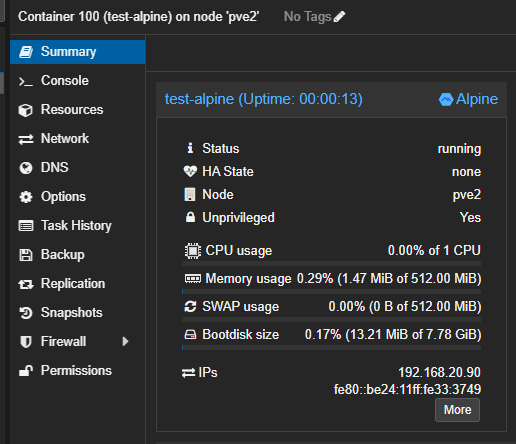
A stock unprivileged Alpine container, 512 MiB, freshly booted. This is the harder target, so it is the one worth testing against.
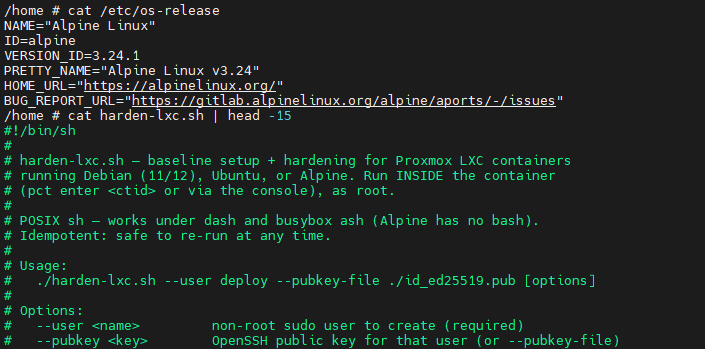
#!/bin/sh, not #!/bin/bash. Alpine 3.24 does not have bash unless you install it, and asking people to install bash before running a hardening script is a bit rude.
On the Debian side it is the familiar path. Here it is on a Debian 13 (trixie) container, started with the same flags you would use on a VM:
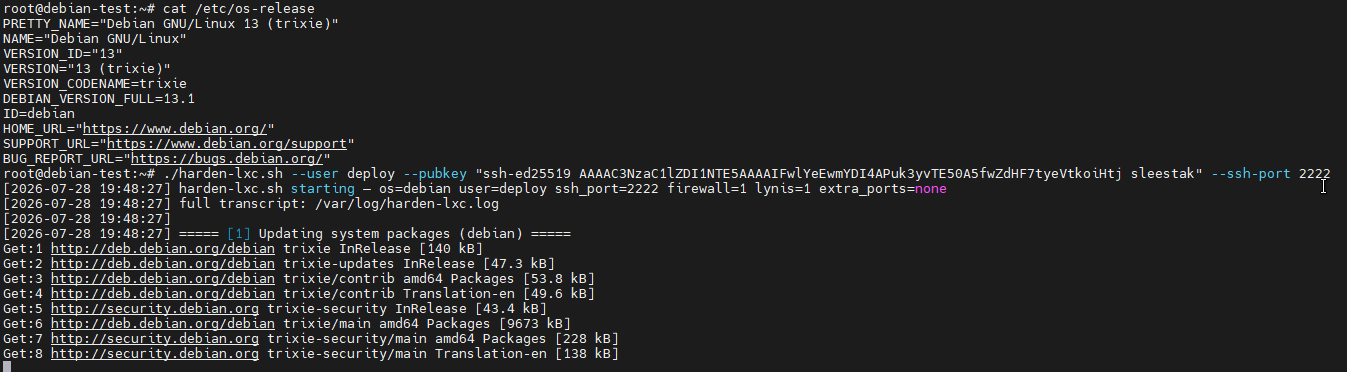
The banner echoes back every setting it parsed, then tells you where the full transcript lives before it does anything else.
The middle of the run is where the container specific behaviour shows up:
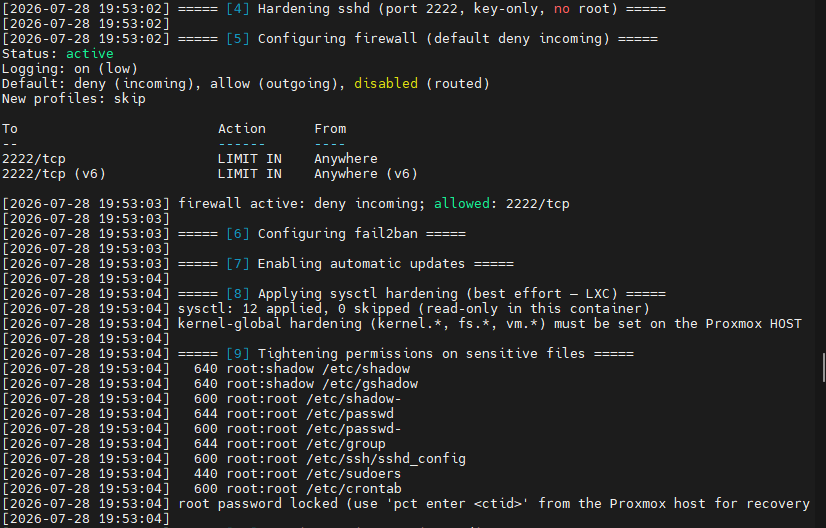
Three things worth pointing out in that screenshot.
ufw limit rather than ufw allow. Rate limiting the SSH port means an address making six or more connections in thirty seconds gets dropped by the firewall itself, before sshd or fail2ban ever sees it.
“sysctl: 12 applied, 0 skipped (read-only in this container)”. Namespaced net.* keys can be set inside an LXC. Kernel global kernel.*, fs.* and vm.* keys cannot, and trying to set them just errors out. The script probes each key, applies what it can, counts what it could not, and prints the reason instead of pretending it succeeded.
The permissions block. /etc/shadow and /etc/gshadow at 640 root:shadow follows the CIS Debian benchmark. The shadow group is empty by default, so in practice it is root only, but it matches what a benchmark scan expects to find. That is handled by a small helper so every file goes through the same code path:
harden_perm() { # harden_perm <path> <mode> <owner:group>
The firewall is the one place where a container genuinely might not cooperate. On Alpine there is no ufw, so the script generates an nftables ruleset instead, validates it, and only then loads it:
if nft -c -f /etc/nftables.nft && nft -f /etc/nftables.nft; then
    svc_enable nftables
    FIREWALL_OK=1
And if the firewall cannot be enabled at all, which is common in unprivileged containers missing NET_ADMIN, the script does not fail. It says so plainly and points you at the layer that can do the job:
WARNING: in-container firewall could not be enabled (common in
         unprivileged LXCs without the needed capabilities).
         Use the Proxmox firewall for this container instead
That felt like the right call after a not so heated debate with claude later. A hardening script that dies two thirds of the way through leaves you worse off than one that finishes and tells you what it could not cover.
Which brings us to the ending:
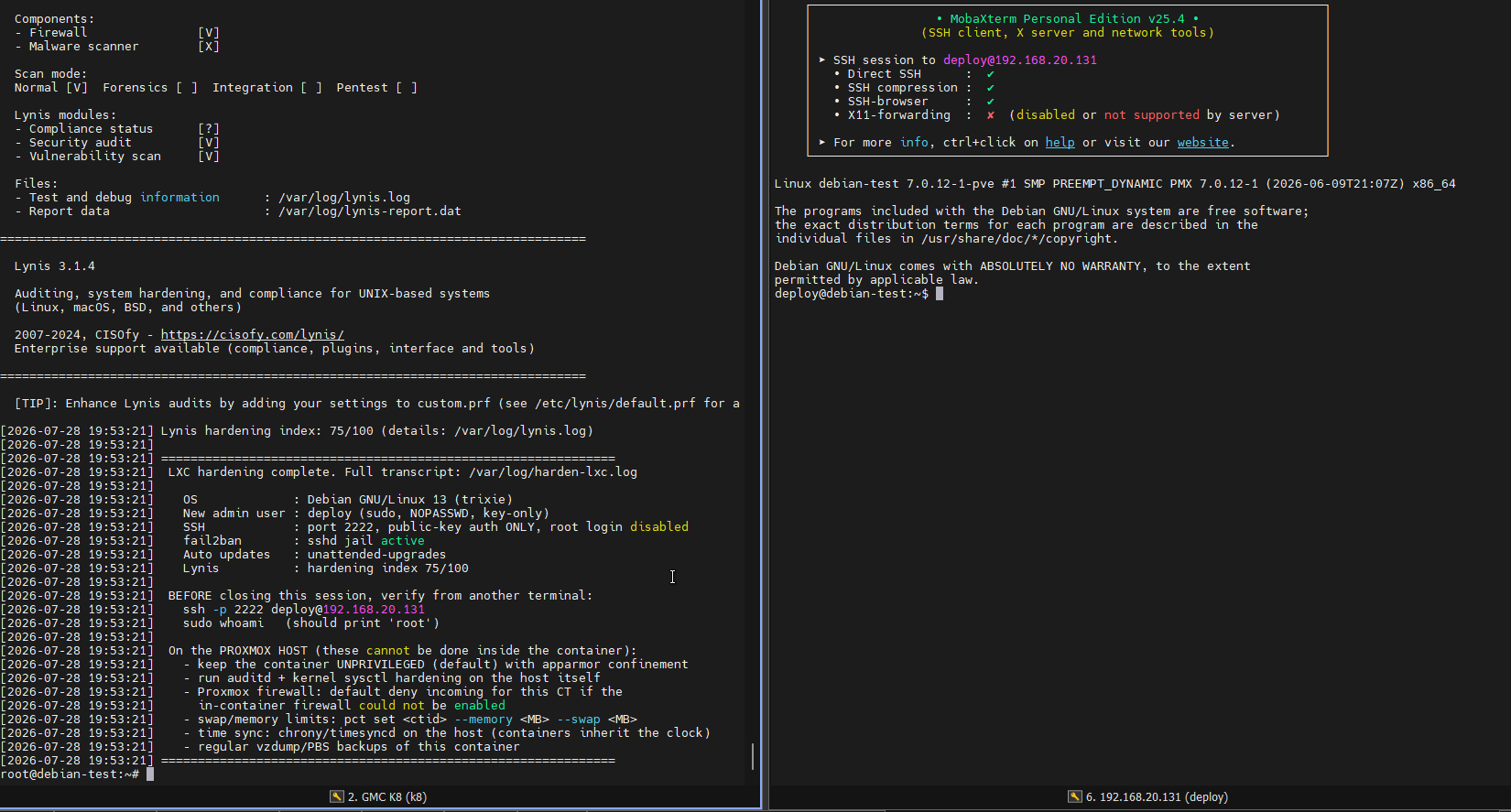
Left: the closing summary, including the explicit checklist of things that are the Proxmox host’s job (auditd, AppArmor, kernel sysctls, swap limits, time sync, backups). Right: the actual point of the exercise, logging in as deploy on port 2222 with a key, from a second terminal, before closing the first one.
Please actually do that second terminal step. The script cannot do it for you.
audit-server.sh: the part I use most
Hardening is a one time event. Drift is forever. Somebody installs a package that ships its own sysctl file, a config gets replaced by an upgrade, I randomly open a port “temporarily” in March. Threat actor gets in and wrecks the host. etc etc. So the auditor is the script I actually run on a schedule.
It is read only by default, and it reads effective state rather than config files. SSH policy comes from sshd -T output, not from grepping sshd_config, because a drop-in you forgot about can override anything. This actually happened to me where my VPS provider had their own drop in that overrided a lot of my good SSHD work. Binary Lane SSHD Malarkey I don’t blame the VPS provider at all for this. But it’s worth checking what sort of lower number confs might be taking priority over any changes you’ve got. The audit script will surface if anything isn’t sticking.
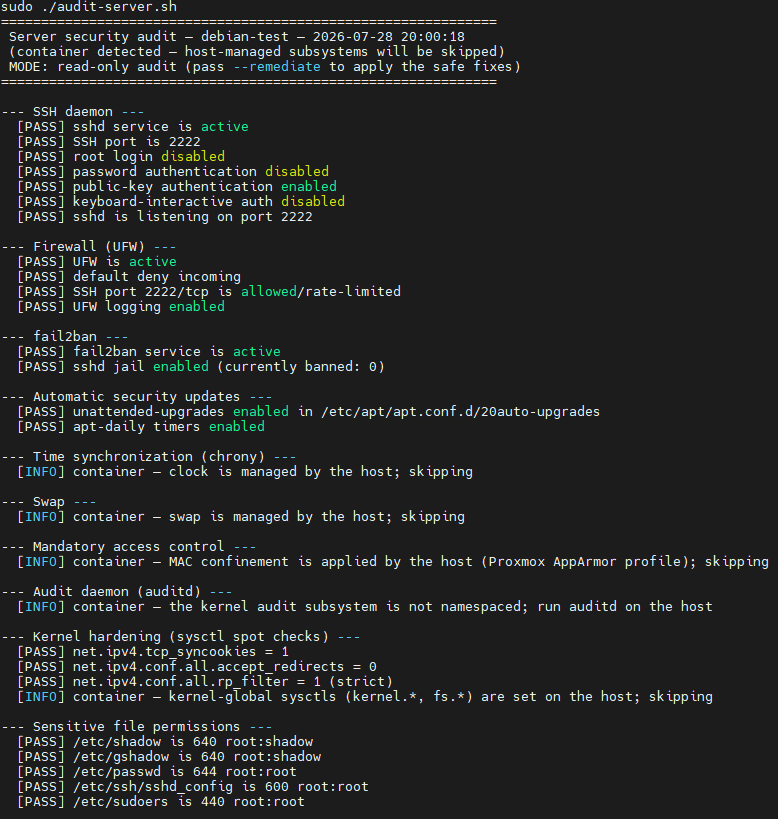
Notice the [INFO] lines. Inside a container the audit does not report auditd, chrony, swap, AppArmor and kernel sysctls as failures. It detects the environment once at startup:
IS_CONTAINER=0
systemd-detect-virt --container --quiet 2>/dev/null && IS_CONTAINER=1

IS_PVE=0
[[ -d /etc/pve ]] && IS_PVE=1
and then skips the subsystems the host owns. A red FAIL you are supposed to ignore is worse than no check at all, because after the third run nobody reads the output.
Every non passing check carries its own remediation, recorded at the point the check runs:
warn() { WARN=$((WARN+1)); printf '  [WARN] %s\n' "$1"; record WARN "$1" "${2-}" "${3-}"; }
bad()  { FAIL=$((FAIL+1)); printf '  [FAIL] %s\n' "$1"; record FAIL "$1" "${2-}" "${3-}"; }
The third argument to record is a safety class, and it is the core idea of the whole script:
[auto]means idempotent, cannot cost you remote access, no reboot. Thinkchmod 600on sshd_config, a missing UFW rule for the port you are already connected on, a sysctl value, starting a service that is installed but stopped.[manual]is everything else. Anything touching SSH config, firewall defaults, key material, the kernel command line, package upgrades, or that needs a human to make a call.
Default is manual. When in doubt, manual.
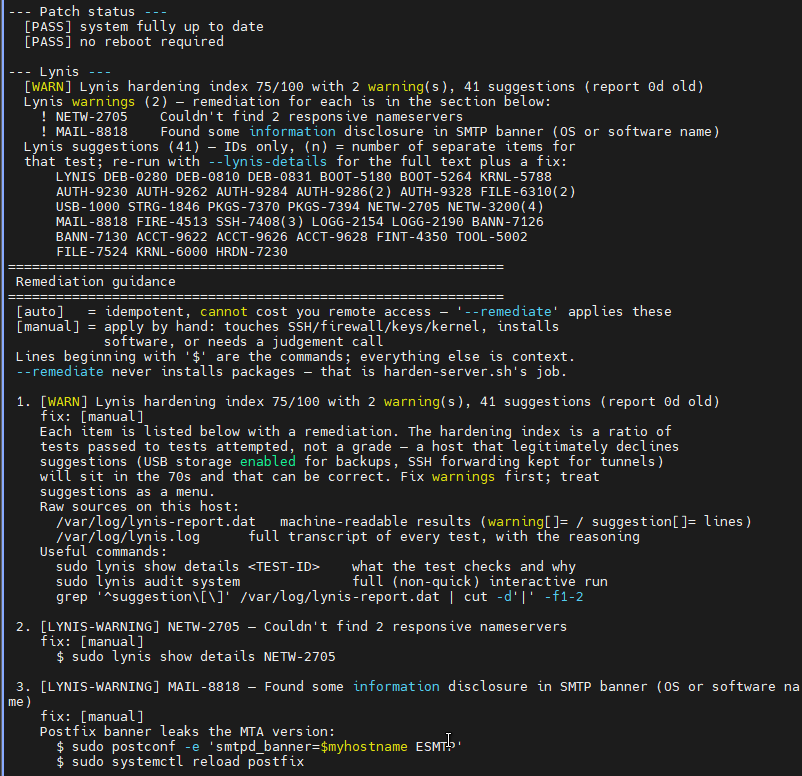
Lynis gets itemised rather than reduced to a score. Every warning gets its test ID, the finding text and a concrete fix. Suggestions are IDs only unless you ask for --lynis-details, because 41 suggestions of full text is a wall.
On the hardening index, since people fixate on it: 75/100 is fine. It is a ratio of tests passed to tests attempted, not a grade. A host that deliberately declines suggestions, keeps USB storage enabled for backups and keeps SSH forwarding for tunnels, will sit in the seventies and be correct. Fix warnings first, treat suggestions as a menu.

The summary is also the exit code. Zero failures gives exit 0, one or more gives exit 1, which is what makes it cron and monitoring friendly.
The same auditor against a Proxmox host
Here is where it gets more useful, because this is a real host that was never run through harden-server.sh. It has been configured by hand over time.
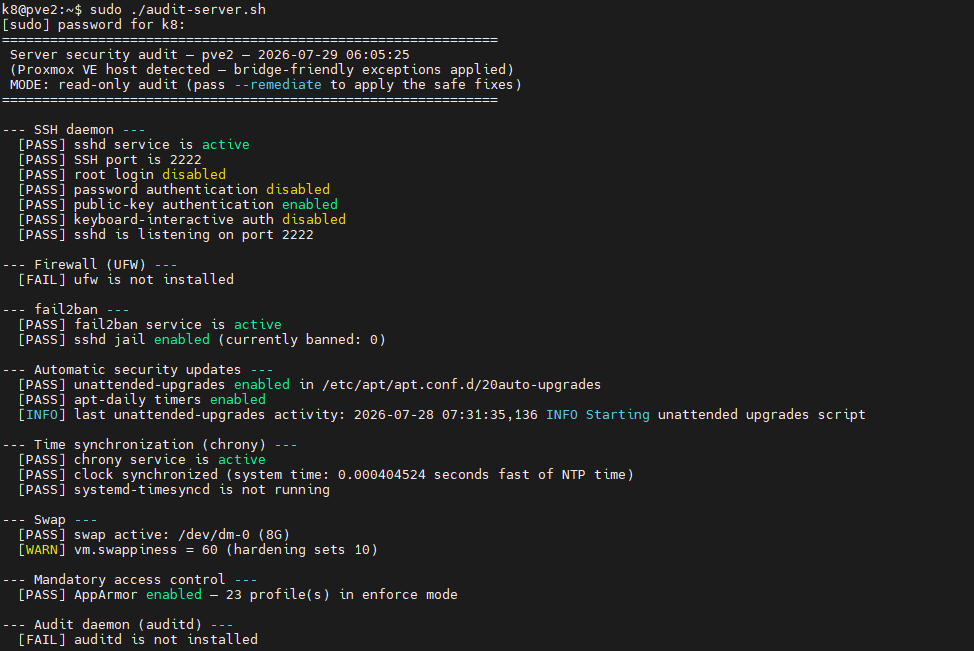
“Proxmox VE host detected, bridge-friendly exceptions applied.” On a PVE node the built in pve-firewall is the natural choice, so a missing ufw is reported but with context rather than a scolding.
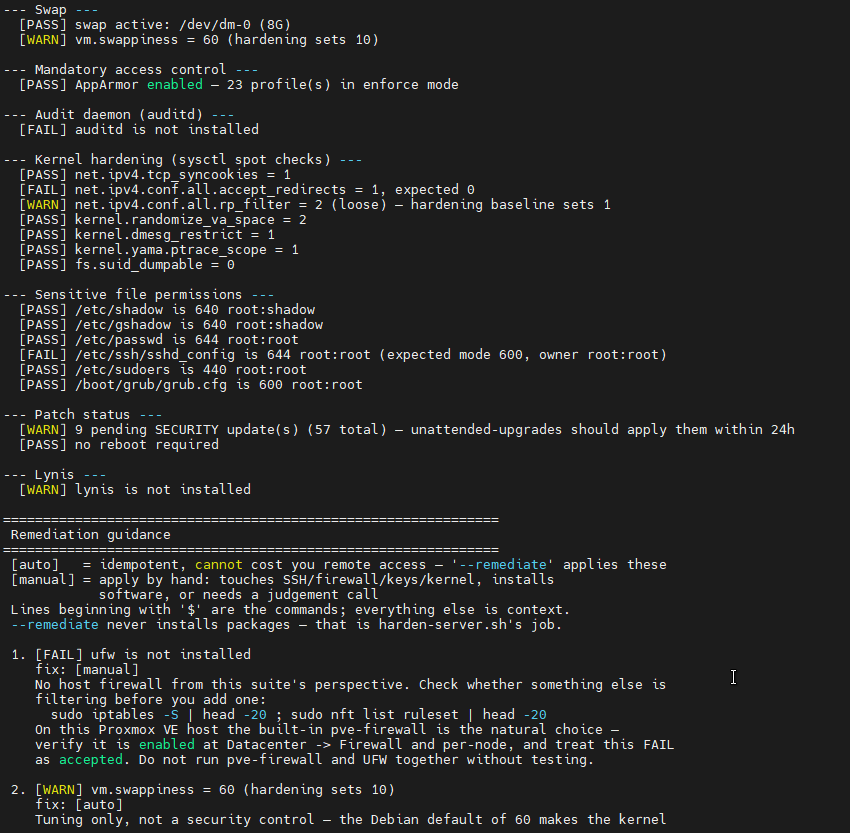
Four real findings on that box: no auditd, accept_redirects left on, sshd_config sitting at world readable 644, and nine pending security updates. That last one is the argument for running this on a schedule in one line.
The remediation section is where I put the most effort, because “FAIL: swappiness is 60” is useless on its own. Every finding gets the reason it matters, the exact commands, and the trade-off if the current state was deliberate:
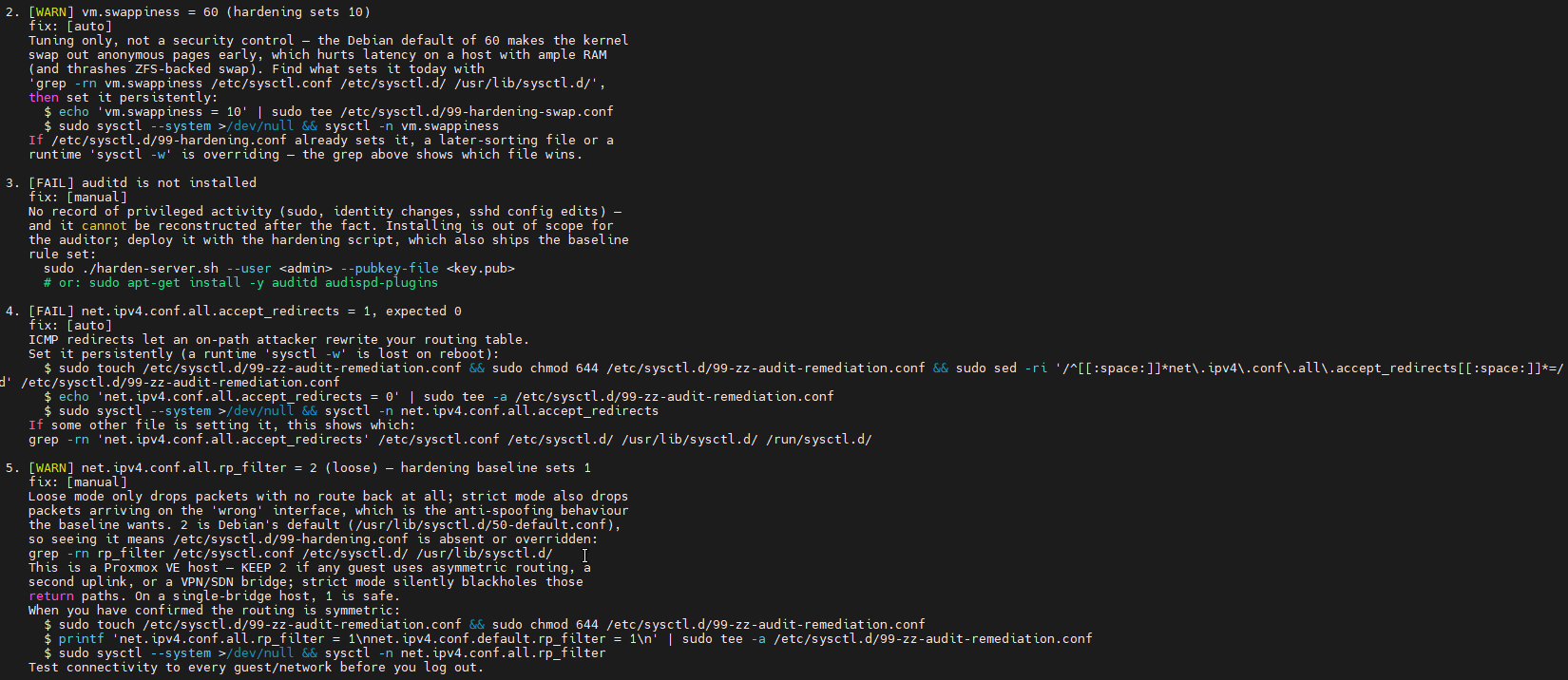
The rp_filter entry is my favourite one to have gotten right. On a Proxmox host, loose mode is often necessary for asymmetric guest routing, so the fix text says “KEEP 2 if any guest uses asymmetric routing” and tells you to verify connectivity before you log out. The baseline wants 1. Sometimes the baseline is wrong for your box.
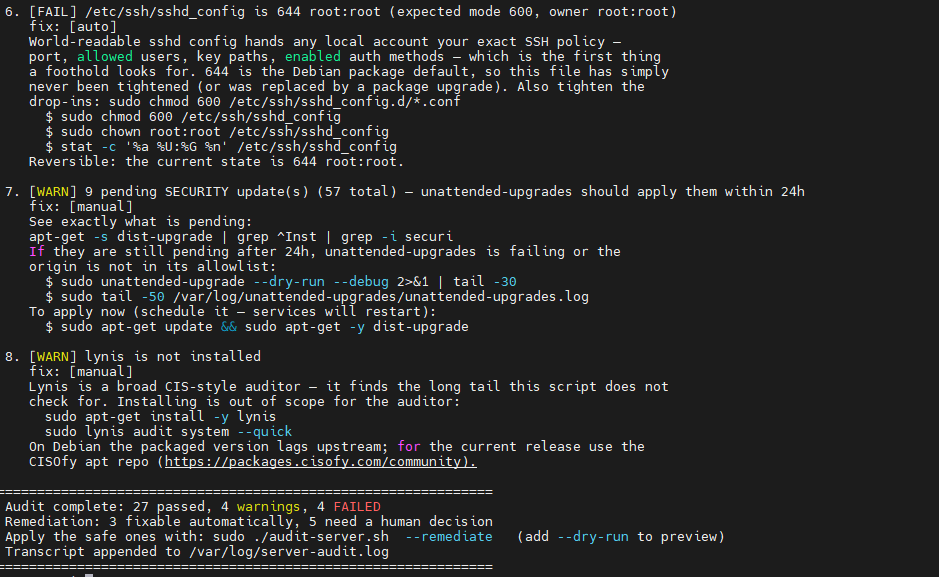
Note the auditd entry says installing is out of scope for the auditor. That is not laziness, it is a rule enforced in code. Even if I misclassify a check as auto, this backstop refuses it:
is_install_cmd() {
    [[ "$1" =~ (apt|apt-get|aptitude|dpkg|yum|dnf|zypper|pacman|apk|snap|pip3?|npm|cargo|gem|go)[[:space:]]+(-[^[:space:]]+[[:space:]]+)*(install|add|-i|--install) ]] \
        || [[ "$1" =~ (curl|wget)[[:space:]].*\|[[:space:]]*(sudo[[:space:]]+)?(ba)?sh ]]
}
A finding containing an install command is skipped whole, never half applied. An auditor that quietly installs software is not an auditor any more.
With that in place, --remediate is safe to actually use:
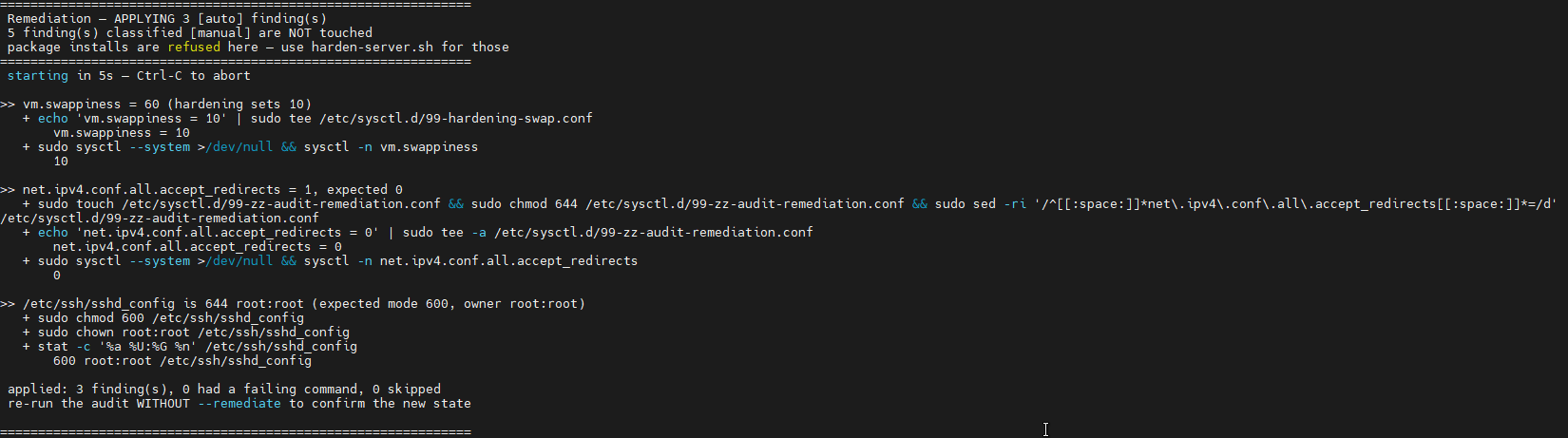
Three auto fixes applied, five manual findings untouched, five second abort window before it starts, and each command echoed with its result. Then it tells you to re-run without --remediate to confirm the new state, which is the only verification that counts.
There is also --dry-run if you want to see the plan first, and --fix-script if you would rather get a mode 700 script to read through and run yourself.
harden-auditd.sh: one script born from one very annoying bug
This one exists because of a trap that cost me an afternoon.
augenrules --load only reloads when its generated output differs from /etc/audit/audit.rules. On a stock Debian box, rules.d/audit.rules contains only -D, -b and -f. So you drop in your rules, run augenrules --load, it prints No change, exits 0, and you have exactly zero rules loaded. Exit code zero. Everything looks fine. Nothing is being audited. What a pain in the hole.
So the script never trusts the loader. It asks the kernel:
EXCUSE ME, JOHN KERNEL, ANY RULES GOING???
LOADED=$(auditctl -l 2>/dev/null | grep -cve '^No rules' || true)
if (( LOADED == 0 )) && [[ "$AUDIT_ENABLED" != "2" ]]; then
    log "augenrules loaded nothing — falling back to 'auditctl -R'"
    auditctl -R /etc/audit/audit.rules 2>&1 | tail -5 || true
    LOADED=$(auditctl -l 2>/dev/null | grep -cve '^No rules' || true)
fi
Exit code 0 from this script means rules were verified present in the kernel, not merely written to disk.
Two other things it handles. It emits modern -a always,exit -F path=... -F perm=... -F key=... syntax rather than legacy -w watches, which auditd 3.1 and later warns about once per rule. And it skips rules naming paths the host does not have, because a rule referencing /etc/crowdsec on a box without CrowdSec is rejected by the kernel and aborts the rest of the file. Silently. Taking your remaining rules with it.
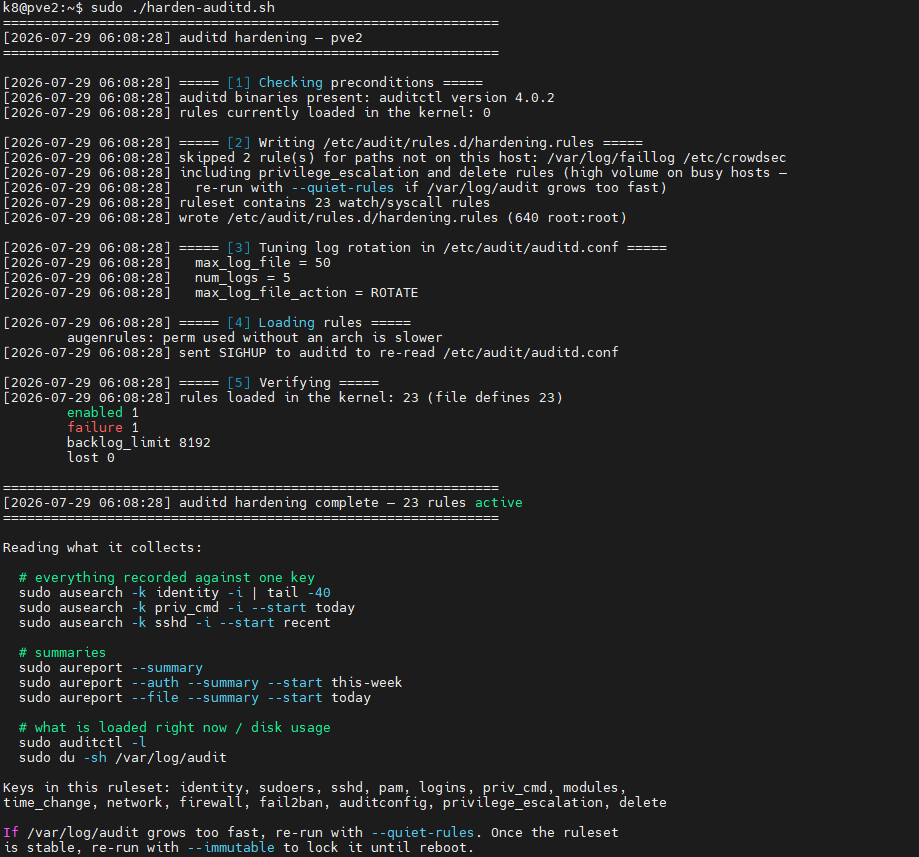
“skipped 2 rule(s) for paths not on this host”, then 23 rules written, then “rules loaded in the kernel: 23 (file defines 23)”. The counts matching is the whole point. It finishes by printing the ausearch and aureport commands for reading what it collects, because collecting audit logs nobody knows how to query is just disk usage.
It also raises retention to 5 x 50 MB. Debian’s stock 5 x 8 MB is a few hours on a busy host, which is not much use when you are reconstructing something that happened on Tuesday.
Things I would tell past me
Docker bypasses UFW. The amount of times I forget this. Published ports go straight into iptables, below your ufw rules. Bind to loopback or use the DOCKER-USER chain. The auditor flags containers publishing on all interfaces, which is how I generally find out or remember the way this behaves.
AllowTcpForwarding no breaks your tunnels. It is in the baseline because it reduces attack surface. If you rely on ssh -L, flip it and know why. Sometimes I love a good tunnel
Fewer checks that people read beats more checks that people skip. Most of the work in the audit script is not the checking, it is deciding what counts as a failure on this particular kind of host.
A dry run mode is not optional. --dry-run and --fix-script get used far more than --remediate does, and that is the correct ratio. I honestly end up doing a lot of the remediation manually based on the scripts feedback anyways, because I don’t trust like that.
Other hardening scripts and utilities worth your time
I did not invent any of this, and depending on your situation one of these may suit you better than a shell script. Just because it works for me, doesn’t mean it will for you. I honestly do not care if you use my scripts or not.
**Other hardening scripts, because the wheel MUST be reinvented (as my wheel is better)
security_harden_linux captainzero’s might hardening scripts medium article with hardening bits medium devsecops post with little hardening nuggets
Frameworks and benchmarks
- CIS Benchmarks are the reference most of the above is derived from. Free PDFs after registration.
- ComplianceAsCode / OpenSCAP content gives you machine readable CIS, STIG and PCI profiles plus generated remediation. The serious option if you have to prove compliance.
- OpenSCAP is the scanner that consumes those.
- Ubuntu Security Guide (usg) is Canonical’s CIS and DISA STIG tooling, bundled with Ubuntu Pro.
Config management, if you have more than a few boxes
- dev-sec.io hardening collection covers os, ssh, nginx, mysql and more as Ansible roles. This is where I would go the moment a shell script stops scaling.
- konstruktoid/hardening is a very thorough Ubuntu focused script and Ansible role, with clear reasoning per control.
Auditing and scanning
- Lynis, used by these scripts, is the best broad first pass on a single host.
- ssh-audit grades your actual SSH key exchange, ciphers and MACs from the client side. Pairs well with Mozilla’s OpenSSH guidelines.
- docker-bench-security is the CIS Docker benchmark as a script.
- kernel-hardening-checker checks your kernel config and boot parameters against known hardening options.
- Trivy for image, filesystem and config scanning.
systemd-analyze securityis already on your box and will rank every unit’s sandboxing. Try it on something you wrote.
Runtime defence
- fail2ban, the classic log parser and banner.
- CrowdSec, same idea plus a shared reputation feed.
harden-server.shcan install it with--crowdsec. - Linux Audit’s auditd rule sets, a good reference if you want a broader ruleset than the baseline here.
- AIDE for filesystem integrity, if you want to know when a binary changes.
Reading
- Debian securing manual
- Arch Wiki: Security, which is excellent regardless of distro
- Proxmox VE firewall docs, essential if you are running containers
Wrapping up
The scripts are not clever. They are the same twenty minutes of setup I was doing by hand, written down once, plus an auditor that tells me when reality has drifted from the plan. The auditor turned out to be the valuable half.
If you take one idea from this, take the safety classification: separate the fixes that cannot possibly hurt you from the ones that need a human, default to the second group, and enforce the boundary in code rather than in a comment. It is what makes automated remediation something you can leave switched on.
Test on a throwaway VM first. Keep a second terminal open. You know the drill.